













From exposed VPN portals to resilient operations—concrete fixes you can roll out without breaking the business.
Ransomware crews—including Akira—are actively targeting SonicWall SSL VPN endpoints through a mix of known vulnerabilities, poor hardening, and risky defaults. Recent advisories point to active exploitation of CVE-2024-40766 against SonicWall SSLVPN portals, renewed attacks on SMA 100/1000 appliances (including an OVERSTEP rootkit campaign), and fresh 2025 patches for critical web-interface issues. If you expose a SonicWall SSL VPN or Virtual Office Portal to the internet—and you haven’t patched and hardened aggressively—assume exposure. Disable internet-facing SSLVPN where feasible, patch SMA/Gen7 devices immediately, lock down the Virtual Office Portal, rotate credentials and MFA, and monitor for signs of compromise.
Attackers aren’t guessing—they’re automating discovery and exploitation at scale. Shodan-style scans flag SonicWall login banners and Virtual Office portals, then botnets probe for vulnerable firmware, weak TLS/cipher settings, and known paths that leak state or session tokens. If they don’t hit a CVE outright, they pivot to credential stuffing against VPN logins (reused passwords from unrelated breaches) and password spraying of common combos. From there, Akira affiliates typically try to enrol their own MFA (where self-service is allowed) or register a rogue TOTP device on an already-compromised account. On SMA 100/1000, successful web-UI exploitation can yield system-level access, letting adversaries drop persistence (e.g., boot-time hooks akin to OVERSTEP), harvest stored LDAP binds, and tunnel deeper into your network.
Misconfigurations often finish the job. Broad “Domain Users” VPN entitlements, open Virtual Office file shares, and split tunnelling to sensitive apps give attackers lateral movement in minutes. Logging gaps make it worse: many SMBs don’t forward portal logs to a SIEM/XDR, so abnormal geo logins, odd user-agents, and after-hours authentications go unseen. Treat the SSLVPN like a tier-zero asset: restrict by geo/IP, require admin-approved MFA, remove self-enrolment, enforce least-privilege AD groups, and keep current firmware only. Finally, watch for post-compromise tells—new local admin accounts on the appliance, sudden config exports, unexplained reboots, or a spike in failed logins. If any of these appear, escalate to incident response immediately.
What’s happening, in plain English
Over the last year, SonicWall remote access gear has drawn sustained attention from criminals:
- Akira ransomware is once again exploiting a critical access-control flaw (CVE-2024-40766) to break into organizations through unpatched SonicWall SSLVPN portals. This is not theoretical; exploitation was observed September 2025. Attackers automate internet-wide scans to find SonicWall banners, then chain credential stuffing with the flaw to gain a foothold. Where self-service MFA is enabled, they attempt to register their own TOTP device, turning a one-time intrusion into durable access. From there, they pivot to Active Directory, target backups, and exfiltrate files for double extortion.
- SMA 100/1000 series devices have seen a run of severe issues. In 2025, SonicWall patched multiple critical web-interface bugs that could lead to remote code execution (RCE) and urged urgent action in light of the OVERSTEP malware/rootkit campaign targeting SMA 100 customers. Some issues are now listed in CISA’s Known Exploited Vulnerabilities (KEV) catalogue. KEV status matters: it signals both reliability and active abuse, which draws copycat actors and commoditized exploit tooling. On appliances with weak segmentation, an RCE on the management plane can quickly become domain compromise.
- Separate from RCE, a format-string bug (CVE-2025-40600) in Gen7 firewall SSLVPN interfaces enables unauthenticated denial-of-service (DoS)—which can still take your remote access offline at a bad time. For SMBs with hybrid or fully remote teams, even a short outage can stall sales, support, and finance operations. Adversaries sometimes pair DoS with extortion or use it to distract while they hit other assets.
- Researchers and incident responders also report misconfigurations—not just CVEs—are opening doors: public Virtual Office Portals, weak LDAP group scoping, and MFA enrolment loopholes allowing attackers to register TOTP on compromised accounts. In short, even “fully patched” boxes can be risky if defaults weren’t tightened. Common pitfalls include granting VPN to “Domain Users,” leaving split tunnelling open to sensitive apps, and failing to send portal logs to a SIEM/XDR—so strange geographies, new user-agents, and after-hours logins go unnoticed.
SonicWall remote-access surfaces are under active, renewed pressure. Patch, harden, restrict exposure, and watch for signs of compromise—now.
Why Canadian SMBs should care
SMBs often rely on a single edge device for VPN, firewall, and remote access. That makes SonicWall appliances a high-value target—one box to own the network. Attackers know many SMBs have:
- Limited patch cycles or legacy firmware.
- “Set-and-forget” configurations left at defaults.
- Over-broad remote access groups tied to Active Directory (AD).
- VPN portals open to the entire internet.
Ransomware crews monetize speed. A successful SonicWall SSLVPN compromise can lead to AD takeover, backup deletion, data theft, and encryption in hours. Recent guidance from multiple vendors and agencies highlights this exact entry path for Akira-style operations.
A quick timeline (2024–2025 highlights)

- 2024–2025: SonicWall ships fixes for critical SMA 100/1000 issues; CISA flags active exploitation of older SMA bugs. That means patch cadence accelerated and several advisories moved from “important” to “drop everything.” KEV listings signalled that proof-of-concept code and real-world intrusions existed, so defenders shifted from routine updates to emergency maintenance windows. Many SMBs discovered end-of-life appliances and had to plan replacements alongside patching—tight timelines, high risk.
- Mid-2025: Reports of OVERSTEP rootkit on SMA 100; SonicWall urges upgrades to 10.2.2.1-90sv or later and highlights CVE-2025-40599. This was not a simple web-shell cleanup. OVERSTEP indicated boot-level persistence and the need for re-image or clean rebuilds, plus credential rotation (LDAP binds, local admins, API keys). Organizations without config backups or documented builds lost critical time recreating policies.
- July–August 2025: Industry chatter about potential zero-day activity on SSLVPN/Gen7; SonicWall acknowledges investigations and recommends strict mitigations while confirming patch guidance. Even as engineering validated fixes, operators were urged to reduce exposure—IP allowlists, rate limiting, enforced MFA workflows, and disabling public Virtual Office. For many, this was the first adoption of “only from known IPs” on VPN portals.
- September 2025: Akira actively exploiting CVE-2024-40766 against unpatched SSLVPNs; multiple advisories emphasize misconfiguration risks (Virtual Office, LDAP defaults, MFA gaps). Attackers mixed CVEs with configuration abuse. Defenders who patched and tightened defaults (group scoping, MFA enrolment controls, logging to SIEM/XDR) fared better; others faced lateral movement, backup tampering, and extortion within hours.
Who is at immediate risk?

If your SonicWall SSLVPN or Virtual Office Portal is openly reachable from the internet, you’re already in the splash zone: automated scanners find these services in minutes and cycle through exploits and password sprays around the clock. Risk climbs further if you’re running SMA 100 firmware below 10.2.2.1-90sv or you’ve deferred late-2024/2025 patches—attackers actively look for version fingerprints to select the right exploit kit. Even fully patched environments get burned when identity controls are loose: default LDAP group mappings that grant “Domain Users,” “Everyone,” or broad department groups effectively turn the VPN into a campus pass, and one compromised account becomes a network-wide key.
The same is true for self-service MFA enrolment from public portals; if an attacker phishes a password, they can register their own authenticator and lock in persistence. Add in missing IP allowlists, split tunnelling to sensitive apps, unmanaged home PCs, shared admin accounts, or SIEM/XDR logging that isn’t forwarding portal events—and you’ve built an easy, repeatable intrusion path.
How attackers are getting in
- Exploit a vulnerable web interface. Adversaries begin with wide internet scans to fingerprint SonicWall portals, then try known paths: CVE-2024-40766 on SSLVPN and a series of 2025 SMA web-UI upload/RCE bugs. When exploitation fails, many switch to unauthenticated DoS to knock the portal offline and pressure IT into making hurried changes or exposing alternate access. Attack chains often include session fixation, weak cookie handling, and downgrade attempts against outdated TLS/cipher suites. Even brief windows between disclosure and patching are enough for automated kits to land a shell.
- Abuse misconfigurations. If Virtual Office is publicly exposed and AD group scoping is broad, one leaked username/password can become a durable beachhead. Attackers test for self-service MFA/TOTP enrolment and immediately bind their own authenticator, so later password resets don’t evict them. Common helpers: default “Domain Users” VPN rights, split tunnelling to finance/ops apps, and portal logs that never reach a SIEM/XDR—so strange geographies and new user-agents slip by.
- Escalate. With appliance or account access, they pivot into Active Directory, hunt for management consoles and backup targets, disable or corrupt protection, and exfiltrate data before detonating ransomware (Akira affiliates favour living-off-the-land tools, RDP, and PSExec). Expect group policy tampering, shadow copy deletion, and rapid account creation for persistence.
- Rootkit persistence (SMA 100). Campaigns like OVERSTEP modify boot routines and implant files so the device survives reboots and wipes of obvious artefacts. Effective cleanup usually means a full re-image to trusted firmware, credential rotation (including LDAP binds and local admins), and a fresh build from known-good configuration backups.
Immediate actions
If you’re an SMB leader, share this list with IT right now.
- Identify exposure
- Find every internet-facing SonicWall SSLVPN and Virtual Office endpoint. If Virtual Office isn’t strictly needed externally, remove or restrict it (IP allowlist or geofence).
- Patch to the latest supported firmware
- SMA 100: Upgrade to 10.2.2.1-90sv or later (addresses CVE-2025-40599 and other issues). Verify no EoL hardware remains in production.
- Gen7 SSLVPN: Apply current SonicOS maintenance releases; review advisories for CVE-2025-40600 (DoS) and any SSLVPN components.
- SMA 1000: Validate remediation for CVE-2025-23006 if applicable.
- Harden access
- Disable legacy/weak ciphers; enforce TLS 1.2+, strong suites.
- Lock down LDAP group filters to the minimal business-justified groups. No “Domain Users.”
- MFA with out-of-band approval (admin-approved enrollment). Don’t allow public self-enrollment from Virtual Office.
- Restrict SSLVPN/portal by source IP (partner offices, staff home IPs, and a managed bastion).
- Credential hygiene
- Rotate all appliance admin and VPN user passwords.
- Invalidate and re-issue MFA/TOTP seeds for any accounts that ever logged in via exposed portals.
- Monitoring & response
- Forward logs to a SIEM/XDR; alert on failed/successful logins from new geos, new user-agent strings, and out-of-hours activity.
- Hunt for OVERSTEP/persistence indicators on SMA 100; treat suspicious devices as compromised until re-imaged.
- If you see anomalous activity, assume credential exposure and initiate incident response.
What “good” looks like (SonicWall SSLVPN hardening baseline)
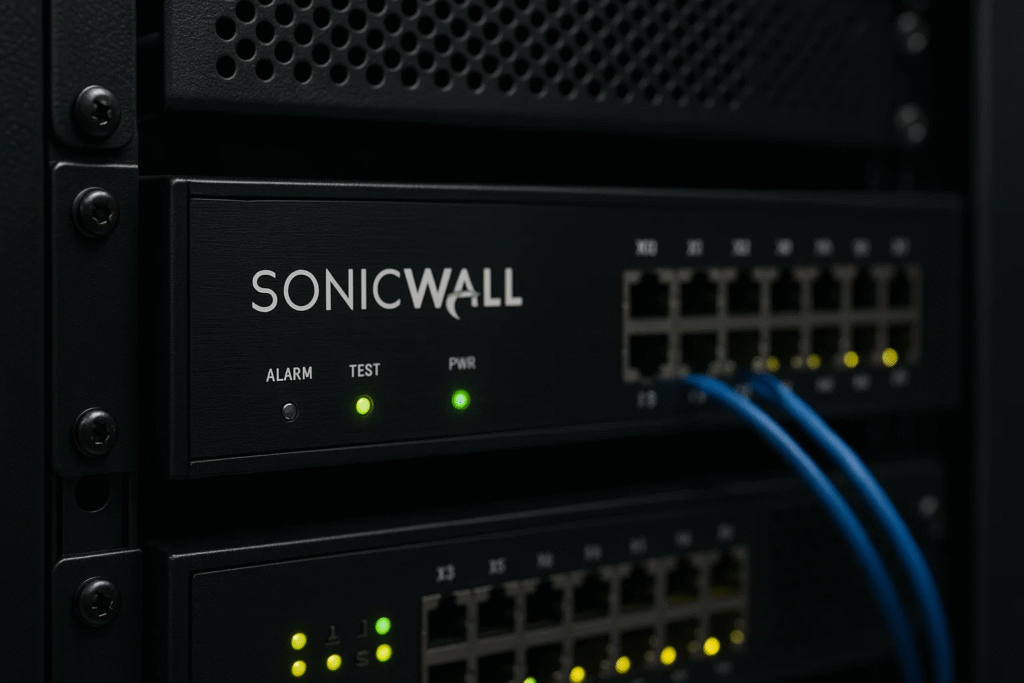
- Exposure minimization: No public Virtual Office unless justified; SSLVPN behind geo/IP restrictions.
- Strong identity boundary: AD group scoping by role (Finance-VPN, OT-VPN, Support-VPN). No nested “All Employees.” Mandatory admin-approved MFA.
- Current firmware only: SMA/Gen7 on the latest supported builds; EoL devices removed from service.
- Config backups & secrets rotation: After patching, rotate admin creds and re-establish MFA seeds.
- Continuous telemetry: Appliance logs into a monitored SIEM/XDR with 24×7 alerting and playbooks.
Compensating controls if you can’t turn SSLVPN off (yet)
- Put SSLVPN behind a reverse proxy that enforces source IP allowlists, rate-limits, and adds bot mitigation.
- Require device posture (managed device certs) before presenting the login page.
- Disable web-based enrollment flows for MFA entirely; force helpdesk-assisted enrollment.
- Limit concurrent sessions, set aggressive account lockouts, and enable login banners to discourage social engineering.
Consider a strategic shift: from legacy SSL VPN to Zero Trust access
Classic SSL VPNs were built for “trust the tunnel.” Modern attacks target that assumption. For many SMBs, it’s time to phase down internet-facing VPN portals and adopt Zero Trust Network Access (ZTNA) with per-app access, device health checks, strong identity, and short-lived tokens.
Benefits for SMBs: No broad network access; users only reach specific apps. Strong device posture (EDR/XDR, OS patch level, disk encryption) before access. Tighter audit trails and easier offboarding. Lower blast radius when credentials leak. You can still keep site-to-site tunnels for branch connectivity while moving remote users to ZTNA.
A practical path is identity-first: integrate ZTNA with your SSO (Azure AD/Microsoft Entra, Okta, etc.), enforce MFA with admin approval, and map roles to least-privilege policies (e.g., Finance-Apps, Support-Tools, Vendor-Portal). Deploy lightweight connectors on-prem to publish legacy web apps, RDP/SSH, and databases without exposing them to the internet. For SaaS, apply conditional access (managed device, compliant OS, no risky IPs) and require device certificates to differentiate corporate endpoints from BYOD. For contractors, offer browser-isolated access with clipboard/download controls to curb data loss.
Plan a phased rollout: start with a 10–20 user pilot, migrate “low-risk” apps first, then retire public VPN portals once coverage hits 80–90%. Track metrics—mean time to revoke access, % of sessions from managed devices, and blocked risky logins—to show ROI. Expect licensing parity with SSL VPN plus SOC time saved from fewer brute-force alerts and fewer emergency patch windows. The end state: no open VPN login page, minimal blast radius, and access that adapts to user, device, and risk in real time.
Budget-minded guidance for SMB leaders
Risk vs. cost: A SonicWall breach typically means downtime + ransom + recovery. Even a day of outage for a 40-person company can exceed a year of managed detection & response (MDR) or ZTNA licensing. Add overtime, lost deals, and reputational damage, and the “cheap” option (deferring upgrades) becomes the most expensive line item.
Where to spend first: Start with the controls that shrink your attack surface today: 1) Patch & harden internet-facing portals (close Virtual Office, add IP allowlists, enforce TLS and modern ciphers). 2) Identity: MFA with admin approval, SSO, a business password manager, and cleanup of over-broad AD groups. 3) EDR/XDR + 24×7 SOC to catch abuse quickly and contain it. 4) Backups: immutable snapshots, offline copies, and quarterly restore tests—no exceptions.
Stretch dollars smartly:
- Prefer OPEX subscriptions over big CAPEX refreshes; bundle ZTNA + EDR under one vendor or MSSP for discounts.
- Use a pilot-first approach (10–20 users) before full ZTNA rollout; expand as you retire public VPN portals.
- Replace ageing, high-touch appliances with supported gear during scheduled windows to avoid premium “fire drill” labour.
- Fund a one-day hardening sprint and a tabletop exercise—low cost, high impact.
- Align with cyber insurance requirements to avoid surcharges and unlock premium credits.
Measure outcomes: Track # of public portals (target: zero), mean time to patch (target: days, not weeks), % of users behind MFA/SSO, EDR coverage (≥95%), and failed-login alerting routed to your SOC. Tie these to quarterly KPIs so security spend stays visible—and defensible.
Canadian context and compliance
While most advisories are U.S.-centric (CISA), the lessons apply directly here. Canadian SMBs face PIPEDA obligations when personal data is breached. If you confirm unauthorized access via your SSLVPN, treat it as a reportable privacy incident and involve counsel. Align changes with recognized frameworks (NIST CSF, ISO 27001) and the MITRE ATT&CK model for detection coverage.
How Fusion Cyber helps
Fusion Cyber is a Montréal-based MSSP/MSP (founded 1985, incorporated 2004) focused on enterprise-grade security for SMBs. We operate a 24×7 SOC, deliver MDR/EDR/XDR, SIEM, threat hunting, vulnerability management, DFIR, backups/BCDR, GRC/awareness, Zero Trust, and more—mapped to MITRE ATT&CK and the Cyber Kill Chain. We also back clients with a financially backed Cybersecurity Guarantee: fully onboarded clients who are breached receive full incident response, containment, and business recovery at our expense. If you need urgent help hardening or migrating off legacy SSLVPN, we’re here.
If you want help pressure-testing your payment controls—or want a two-page Payment Verification Standard you can roll out by next week
Related Reads:
Akira exploiting SonicWall SSLVPN flaw (CVE-2024-40766).
SonicWall advisories for SMA 100 (OVERSTEP, CVE-2025-40599; required versions)
Gen7 SSLVPN DoS (CVE-2025-40600)
FAQ:
We patched in 2024. Are we fine?
Not necessarily. New 2025 advisories (e.g., CVE-2025-40599, CVE-2025-40600) and active exploitation reports mean you should verify current firmware and re-check hardening now.
What if we need Virtual Office for vendors?
Expose it only from known vendor IPs (allowlist), require admin-approved MFA, and audit logins weekly. Consider moving vendors to per-app ZTNA instead.
How do we know if we’ve been hit?
Look for unusual portal logins, new MFA enrollments, admin logins at odd hours, config changes, or SMA 100 persistence indicators (OVERSTEP). If found, treat as compromise, re-image where indicated, and initiate IR.
Should we abandon VPN entirely?
For many SMBs, yes for users (move to ZTNA); no for sites (keep site-to-site IPsec). This reduces the attack surface while preserving essential connectivity.
Our Cybersecurity Guarantee
“At Fusion Cyber Group, we align our interests with yours.“
Unlike many providers who profit from lengthy, expensive breach clean-ups, our goal is simple: stop threats before they start and stand with you if one ever gets through.
That’s why we offer a cybersecurity guarantee: in the very unlikely event that a breach gets through our multi-layered, 24/7 monitored defenses, we will handle all:
threat containment,
incident response,
remediation,
eradication,
and business recovery—at no cost to you.
Ready to strengthen your cybersecurity defenses? Contact us today for your FREE network assessment and take the first step towards safeguarding your business from cyber threats!